Nadakacheri Caste Certificate Download Online – Free 2026
If you already have a Nadakacheri Caste Certificate, you can access a digital copy online without making an unnecessary visit to a service centre. The certificate is also useful for verification activities such as the Special Intensive Revision (SIR) by the Election Commission of India and Gruha Jyothi application verification by Karnataka ESCOMs.
Earlier, citizens could pay ₹40 to download a certificate, but eligible existing certificates can now be accessed without that earlier download charge. In this guide, we’ll explain how to find and download your certificate using an RD Number, Aadhaar Number, or Ration Card Number.
Who Can Download a Caste Certificate Online?
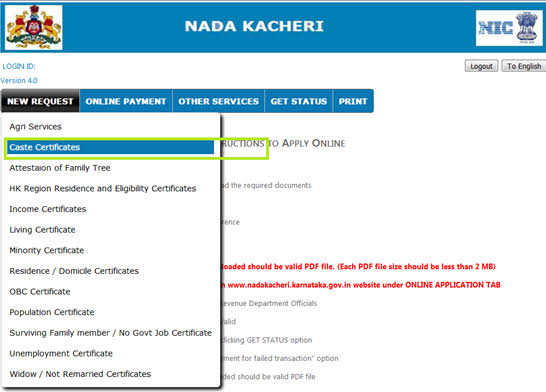
This facility is mainly useful for citizens who already have a caste certificate issued through the Karnataka system.
If your certificate has already been issued, you can try to access its digital copy using the information associated with the record. If you are applying for a new caste certificate, that is a separate process and may have different requirements or charges.
Keep These Details Ready
Before you start, check which information you have available:
- RD Number or Certificate Number
- Aadhaar Number
- Ration Card Number
- Mobile number linked with Aadhaar, if Aadhaar authentication is required
Having the RD Number is particularly helpful because it is directly associated with the issued certificate.
Find Your Caste Certificate Online
If you already have an issued caste certificate, you can try to access its digital copy using the details connected to your record. The available options may include your RD Number, Ration Card Number, or Aadhaar Number.
Option 1: RD Number or Ration Card
Step 1: Open the official Karnataka certificate service from the link provided on this page.
Step 2: Choose the identification method you want to use. Select Certificate Number if you have your RD Number, or choose the Ration Card Number option if your certificate is linked to your ration card. Enter the required details and complete the security verification.
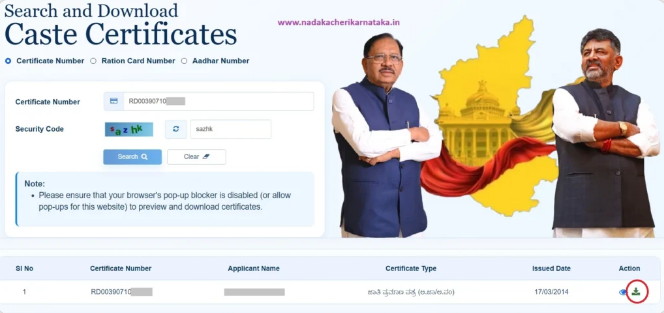
Step 3: Submit the information to check your record. If a matching certificate is available, details such as your name and certificate information will be shown. Check everything carefully, then use the available download option to save the certificate as a PDF.
Option 2: Aadhaar Number
Step 1: Open the official Karnataka certificate service and select the Aadhaar Number option.
Step 2: Enter your Aadhaar number and continue with the authentication process. If OTP verification is required, request the OTP and enter the code received on your Aadhaar-linked mobile number.
Step 3: After successful authentication, the system will check whether a certificate is associated with your Aadhaar details.
Step 4: If your caste certificate is found, review the information and download the available PDF copy. If no certificate appears, your Aadhaar may not be linked to that record. In that situation, try using the RD Number or Ration Card Number instead.
Certificate Not Showing? Here’s What to Do
Sometimes an online search may not return a certificate even when you know it was issued.
The first thing to do is try a different identification method. For example, if Aadhaar doesn’t work, use the RD Number. If you don’t have the RD Number, you can try the ration card details if they were linked with the record.
Also check that you have entered the number correctly. A small typing error can prevent the system from finding the record.
If you still cannot locate the certificate and don’t have the required reference details, contact the relevant Nadakacheri/Taluk office for assistance.
Save a Copy for Future Applications
After downloading your caste certificate, keep the PDF in a safe location. You can store it on your computer or phone and keep another backup in secure cloud storage.
Having a digital copy ready can save time when a caste certificate is requested during an online application or document verification.
You can also print the downloaded PDF whenever a physical copy is needed.
Is the Download Free in 2026?
Yes. Under the applicable 2026 online facility, eligible citizens can download an existing caste certificate without paying the earlier ₹40 download fee.
However, downloading an already-issued certificate should not be confused with applying for a new caste certificate. New applications can have separate requirements and applicable charges.
Important Things to Check
Before using your downloaded certificate, make sure:
- Your name is correct.
- The certificate belongs to you.
- The RD/Certificate Number is correct.
- The certificate information is readable.
- The PDF has been saved properly.
If you notice an error in the certificate itself, contact the appropriate authority instead of editing the downloaded document.
Conclusion
Downloading a caste certificate online in Karnataka is now a simple way to get an existing certificate without making an unnecessary visit to a government office. With your RD Number, Aadhaar Number, or Ration Card Number, you can access the available record, verify your details, and save the certificate as a PDF. Once downloaded, keep a secure digital copy so it is ready whenever you need it for applications, verification, or other official work.
Frequently Asked Questions
Can I download my caste certificate for free?
Yes. Eligible existing certificates can be downloaded online without the earlier ₹40 charge.
Which details can I use?
You can use your RD Number, Aadhaar Number, or Ration Card Number, if linked to your certificate.
Is the RD Number the easiest option?
Usually, yes. If you have the RD Number, it is a simple way to access your certificate.
What if Aadhaar does not find my certificate?
Try using your RD Number or Ration Card Number instead.
Can I print the downloaded certificate?
Yes. Save the PDF and print a copy whenever you need it.