Nadakacheri Certificate Verification (CV) – Verify Your Certificate by RD Number
If you have received a certificate through the Karnataka Revenue Department, it is important to verify that it is genuine before using it for official purposes. The Nadakacheri Certificate Verification (CV) service allows anyone to check the authenticity of certificates issued through the Atalji Janasnehi Kendra (AJSK) portal.
Whether you are applying for a government scheme, college admission, scholarship, or employment, verifying your certificate online helps confirm that the document is valid and officially issued. The verification process is quick, secure, and completely online.
What is Nadakacheri Certificate Verification?
Nadakacheri Certificate Verification (CV) is a digital facility provided through the Karnataka Revenue Department’s AJSK portal to help users verify the authenticity of government-issued certificates. By entering the certificate’s RD Number, the system instantly checks whether the document is available in the official database.
This online service is useful for citizens, employers, educational institutions, and government authorities who need to confirm that a certificate is genuine before accepting it for official purposes. The verification process is fast, secure, and eliminates the need to visit a Nadakacheri office in most cases.
Why Should You Verify Your Nadakacheri Certificate?
Certificate verification is useful in many situations. It confirms that the certificate has been officially issued and has not been altered.
Some common reasons include:
- Confirm the authenticity of your certificate.
- Prevent the use of fake or duplicate documents.
- Verify documents before government applications.
- Validate certificates for school, college, or university admissions.
- Check documents submitted during recruitment.
- Ensure certificates are accepted without unnecessary delays.
Certificates That Can Be Verified
The verification portal supports many certificates issued through Nadakacheri, including:
| Certificate Type | Verification Available |
|---|---|
| Income Certificate | ✅ Yes |
| Caste Certificate | ✅ Yes |
| Residence Certificate | ✅ Yes |
| Agricultural Certificate | ✅ Yes |
| OBC Certificate | ✅ Yes |
| Pension Related Certificates | ✅ Yes |
| Other Revenue Department Certificates | ✅ Yes |
How to Verify Nadakacheri Certificate Online
Verifying your certificate only takes a few minutes.
Step 1: Open the Official Verification Portal
Visit the official Nadakacheri Certificate Verification (CV) page.
Step 2: Enter Your RD Number
Locate the RD Number (Acknowledgment Number) printed on your certificate or acknowledgment receipt and enter it carefully.
Step 3: Complete the Security Verification
Enter the security code (Captcha) displayed on the screen.
Step 4: Click “Show Certificate Details”
After clicking the button, the system will search the Revenue Department database.
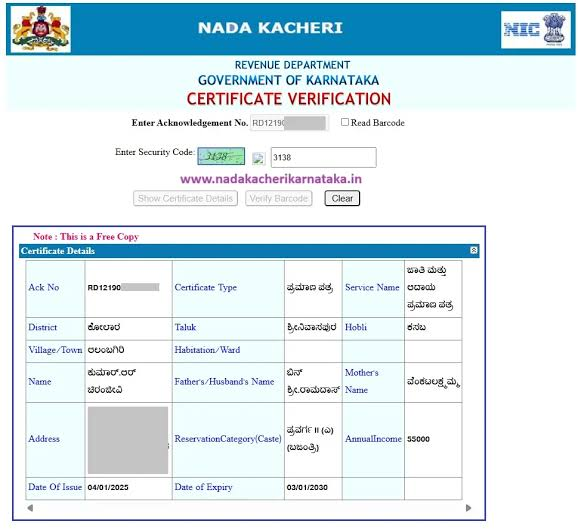
If your certificate is valid, complete information will appear on the screen.
Information Displayed After Successful Verification
When the certificate is successfully verified, you may see information such as:
- Applicant Name
- Certificate Number
- Certificate Type
- RD Number
- Applicant Photograph
- Address
- Issue Date
- Validity Status
- Issuing Authority
This confirms that the certificate exists in the official Nadakacheri database.
What Does “Certificate Expired / Invalidated” Mean?
Sometimes the portal may display a message like:
Certificate Expired / Invalidated
This usually means one of the following:
- The RD Number was entered incorrectly.
- The certificate has expired.
- The certificate has been cancelled.
- The certificate is unavailable in the online database.
- The document was not issued through Nadakacheri.
Always recheck the RD Number before trying again.
Who Can Use Nadakacheri Certificate Verification?
The online verification system is useful for different types of users.
Citizens
Individuals can verify their certificates before submitting them to any office.
Employers
Companies can confirm whether employee documents are genuine.
Educational Institutions
Schools, colleges, and universities can verify student certificates during admission.
Government Departments
Departments can validate certificates submitted for welfare schemes and public services.
Banks and Financial Institutions
Banks may verify income or residence certificates during loan processing or financial verification.
Common Reasons Why Verification Fails
If your certificate is not verified online, there may be several possible reasons.
- Incorrect RD Number
- Typing mistakes
- Expired certificate
- Cancelled certificate
- Temporary server issue
- Certificate issued by another department
Checking these issues usually resolves the problem.
What Should You Do If Verification Does Not Work?
If the verification fails even after entering the correct details:
- Verify that the RD Number has been entered correctly.
- Refresh the page and try again.
- Wait for some time if the portal is under maintenance.
- Visit your nearest Nadakacheri Center if required.
- Contact the Karnataka Revenue Department for further assistance.
Benefits of Using the Online Verification Portal
Using the online verification system offers several advantages.
- Available 24 hours a day.
- No need to visit government offices.
- Instant verification results.
- Free online service.
- Secure government database.
- Helps prevent document fraud.
- Saves time and paperwork.
Important Tips Before Verification
Before starting the verification process, keep these points in mind:
- Use only the official Nadakacheri portal.
- Enter the RD Number exactly as printed.
- Check your internet connection.
- Complete the Captcha carefully.
- Never share personal certificate details on unofficial websites.
Conclusion
The Nadakacheri Certificate Verification (CV) portal provides a quick and reliable way to confirm the authenticity of certificates issued by the Karnataka Revenue Department. By entering the correct RD Number, users can instantly verify their documents online without visiting a government office. This simple process helps prevent fraud, saves time, and ensures that only valid certificates are used for official purposes.
FAQs
1. Is Nadakacheri Certificate Verification free?
Yes, the online verification service is completely free.
2. What is the RD Number?
It is the unique acknowledgment number used to verify your certificate.
3. Why is my certificate not verified?
This may happen due to an incorrect RD Number, an expired certificate, or invalid details.
4. Can I verify someone else’s certificate?
Yes, if you have the correct RD Number, you can verify the certificate online.