Nadakacheri Application Status 2026: Track Caste, Income & Other Certificate Status Online
The Karnataka Nadakacheri portal provides various Revenue Department services online, allowing citizens to apply for certificates such as Caste Certificate, Income Certificate, Residence Certificate, Domicile Certificate, and other essential documents. After submitting your application, you can easily check the Nadakacheri Application Status online without visiting any government office.
Applicants can track the status of their certificates using either the Acknowledgment (RD) Number or the Registered Mobile Number. This guide explains both methods and helps you understand the different status updates displayed on the portal.
Nadakacheri Application Status – Quick Details
| Particular | Details |
|---|---|
| Portal Name | Nadakacheri Portal |
| Service | Application Status Tracking |
| Track Using | RD Number or Registered Mobile Number |
| Mode | Online |
| State | Karnataka |
How to Check Nadakacheri Application Status Online?
The Nadakacheri portal offers two simple ways to check your application status:
- Using the Acknowledgment (RD) Number
- Using the Registered Mobile Number
Choose the method that is convenient for you and follow the steps below.
Check Nadakacheri Status Using RD Number
If you have your acknowledgment slip or the SMS received after submitting the application, you can check your status using the RD Number.
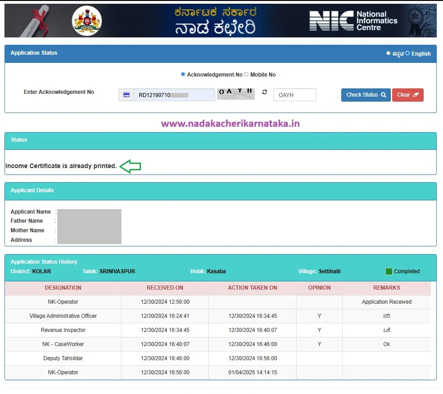
Step 1: Visit the official Nadakacheri Application Status page.
Step 2: Select your preferred language.
Step 3: Choose the “Acknowledgment No” option.
Step 4: Enter your Certificate RD Number.
Step 5: Type the CAPTCHA shown on the screen.
Step 6: Click “Check Status” to view the latest status of your application.
The portal will display the current processing stage along with other application details.
Check Nadakacheri Status Using Mobile Number
If you have misplaced your acknowledgment number, you can still check your application status using the registered mobile number.
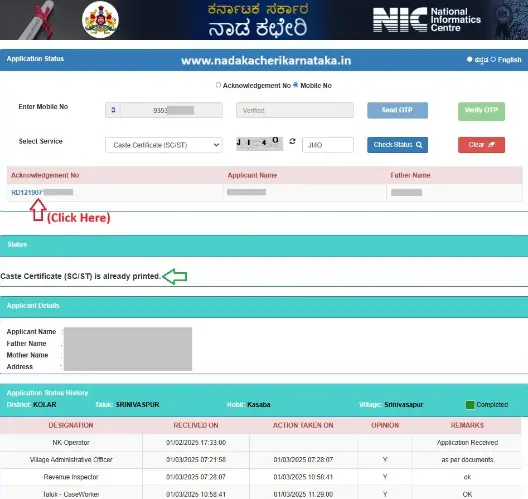
Step 1: Open the Nadakacheri Application Status page.
Step 2: Select the “Mobile No” option.
Step 3: Enter your 10-digit registered mobile number and click “Send OTP.”
Step 4: Enter the OTP received on your mobile phone and click “Verify OTP.”
Note: The mobile number must be the same one that was used while submitting the application.
Step 5: Select the certificate or service from the available list.
Step 6: Enter the CAPTCHA and click “Check Status.”
Step 7: A list of applications linked to your mobile number will appear. Click the relevant RD Number to view the complete application status.
Understanding Nadakacheri Application Status
After checking your application, you may see different status terms on the portal. Their meanings are explained below.
DESIGNATION
This section shows the officer currently handling your application. Depending on the certificate, the application may be processed by:
- Village Administrative Officer (VAO)
- Revenue Inspector (RI)
- Nadakacheri Case Worker
- Deputy Tahsildar
- Tahsildar
RECEIVED ON
It shows the date and time when the concerned officer received your application for verification.
ACTION TAKEN ON
This indicates the date and time when the officer reviewed or processed your application.
OPINION
The opinion field displays the officer’s recommendation.
- Y (Yes): The application has been verified successfully and can move to the next stage.
- N (No): The application cannot be approved because of incorrect information or missing documents.
REMARKS
The Remarks section contains comments from the concerned officer. If your application is rejected or requires correction, the reason will be mentioned here.
After approval from all concerned officials, the application is forwarded to the Deputy Tahsildar or Tahsildar for digital signing. Once the e-sign process is completed, your certificate becomes available for download and printing.
Conclusion
Checking your Nadakacheri Application Status 2026 is a quick and simple online process. Whether you use your RD Number or registered mobile number, you can track every stage of your application from submission to final approval. Make sure your application details and documents are accurate to avoid delays and receive your certificate without any hassle.
Frequently Asked Questions
1. Can I check my application without the RD Number?
Yes. Use your registered mobile number and verify it with the OTP.
2. Why is my application showing as Pending?
It means your application is still under verification by the concerned officer.
3. How will I know if my certificate is approved?
You can check the status online or wait for the SMS sent to your registered mobile number.
4. Can I edit my application after submission?
No. If you entered incorrect details, you need to submit a new application.
5. Why am I not receiving the OTP?
Ensure you entered the correct registered mobile number and try requesting the OTP again after a few minutes.